


EveryDollar: Budget Management
4.36.80K Reviews
App Specs
- Version
- 2026.8.260
- Updated On
- License
- Free
- Downloads
- 1,000,000+
- Developer
- Ramsey Solutions
- Categories
- Finance
- Platform
- Android
Screenshots

 Analysis by AppCompare
When I’m deciding whether a budgeting app is worth keeping, I look beyond the first setup screen: can I use it to make a real choice before I spend, and can I keep it current without turning money management into another chore? EveryDollar is built around giving planned dollars a purpose. That makes it most useful when you want to decide what your money should do before the month gets busy, rather than only reviewing transactions afterward.
What the free starting point tells you
EveryDollar is a finance app from Ramsey Solutions, and it is free to download. The app is rated for Everyone, so it is presented for a broad audience rather than a narrowly defined age group. Its average rating is 4.3 from around 15,000 ratings, with over a million installs. Those figures suggest that it has reached many people, but they do not tell me whether its method will suit your habits; that depends more on whether you are willing to plan and revisit a budget.
The free starting point is useful for trying the budgeting approach before deciding whether you need paid extras. In-app purchases range from $7.99 to $129.99 per item, so I would check the current purchase details in the app before paying rather than assume every paid option costs the same or includes the same things. The practical question is not simply whether a premium tier exists, but whether a particular paid feature would save you enough time or improve your decisions enough to justify its price.
Where the value comes from
The strongest value here is the budgeting routine, not a promise that the app will make financial choices for you. Assigning income to categories gives you a plan to compare with what actually happens. That can be more actionable than opening a bank app after a purchase and seeing only the balance. If you tend to lose track of small expenses, a category plan can make the trade-off visible before you spend: adding more to dining out means deciding what will receive less.
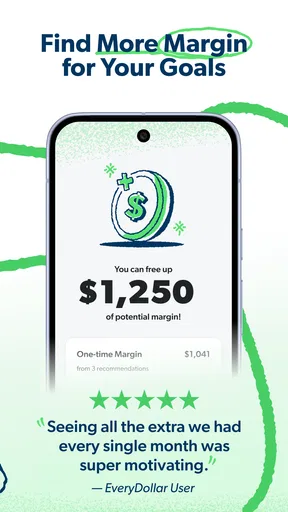
I would treat the first budget as a working draft, not a test you can pass or fail. Start with the categories that matter most in your month, then adjust them when the real numbers show where your estimates were off. This is especially helpful for someone who has never budgeted: it turns an intimidating financial goal into a series of small decisions. It also makes the app less suitable for someone who wants a completely hands-off record of spending and does not want to plan categories.
Trade-offs to consider before paying
Manual entry has a real cost in attention. It can help you notice spending as it happens, but it also means remembering to record purchases and update the plan. If you already manage money with a spreadsheet, the app may feel more convenient on a phone without changing the amount of work involved. If you are comparing it with a bank’s built-in spending chart, remember that a chart summarizes transactions while this style of budgeting asks you to make a plan first; neither approach is automatically better for everyone.
Before upgrading, I would ask myself one practical question: what task am I paying to make easier? If the answer is clearer visibility or less manual upkeep, compare the exact paid option with the free workflow you have actually used. If you have not yet kept a basic budget current, paying for extras may not solve the underlying habit problem. The app is a better fit when you want its budgeting method and will return to it regularly, not simply because a paid tier sounds more complete.
Worth Reading Before You Choose

EA SPORTS FC Mobile 26 Is a Bigger Football Game, but It Takes Time

Flipboard Shows What News Apps Must Do Beyond the Feed

Switching to Android Auto Means Rethinking Your Driving Routine

Google Calendar Makes a Crowded Week Easier to Manage

Ludo King Makes the Most of the Minutes Between Plans

Baby Panda World Brings Quick Play to Modern Phones, but Its Game Library Feels Busy
Who is likely to get the most from it
I can see EveryDollar working well for a household trying to coordinate everyday spending, a student learning to plan around limited income, or someone who wants a clearer route from payday to savings goals. A useful routine is to make the plan when income arrives, check category amounts before larger variable purchases, and review the month before building the next one. That final review is where you can spot a recurring mismatch, such as consistently underestimating groceries, and change the plan instead of blaming yourself for missing an unrealistic target.
It is less compelling if you want investment analysis, a detailed net-worth dashboard, or a system that handles complicated and unpredictable finances with little manual attention. People with irregular income can still use a plan, but they may need to update it more often as money arrives and priorities change. If your main need is simply to see account balances, your bank’s own app may be more direct; if you want flexible custom calculations, a spreadsheet may offer more control. EveryDollar’s appeal is narrower and clearer: it puts planned categories at the center.
Getting Started with Confidence
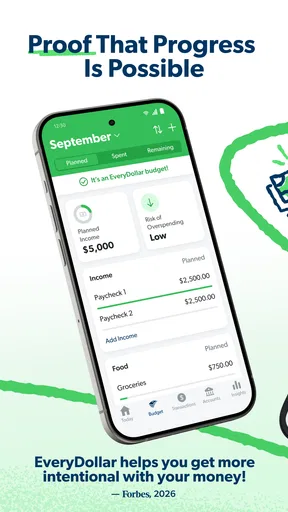
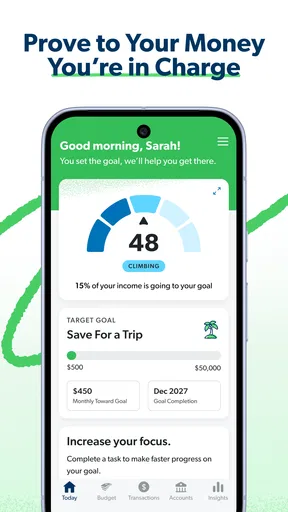
Launching the EveryDollar app feels like opening the door to a less stressful financial future. Setting up was surprisingly easy. After a quick sign-up, I was greeted with a clean, intuitive interface. Right off the bat, it asks you to input your income and categorize your expenses. This is where the magic begins, as it automatically starts crafting a budget tailored just for you.
One of the features I loved was the drag-and-drop simplicity. Moving funds from one category to another felt as easy as rearranging furniture in a virtual room. It’s all about giving you control while making the process feel less daunting. Plus, let’s be honest, anything that makes adulting feel like a game rather than a chore is a win in my book.
Features That Stand Out
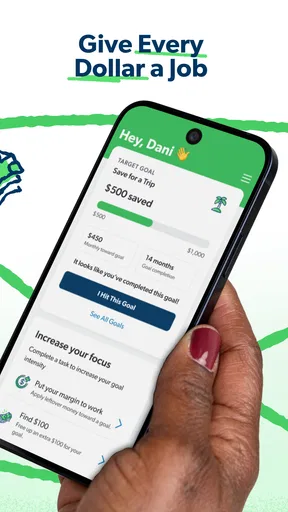
What sets this app apart from others? For starters, its zero-based budgeting approach. This concept means that every dollar you earn is assigned a job, ensuring no money is left unaccounted for. The app’s name isn’t just catchy; it’s a philosophy.
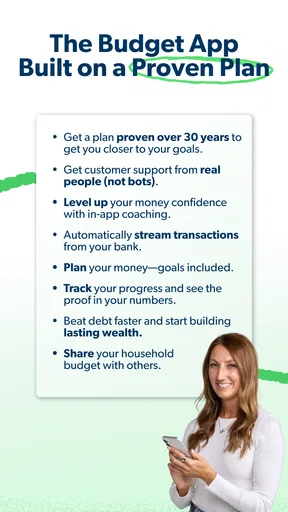
Another standout feature is the seamless syncing across devices. Whether you’re on your phone or tablet, your budget is always up to date. This real-time synchronization was a game-changer for me, especially when I needed to quickly check my budget at the grocery store.
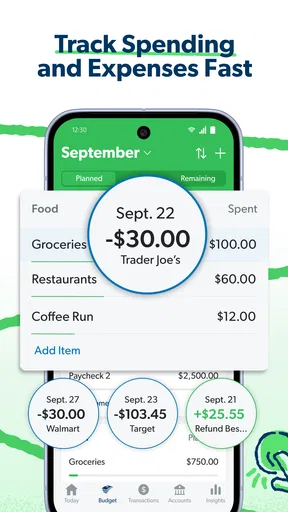
If you’re a fan of tracking spending down to the penny, you’ll appreciate the ability to connect your bank account. This feature lets EveryDollar automatically update your transactions, saving you time and ensuring accuracy.
Usability and Performance
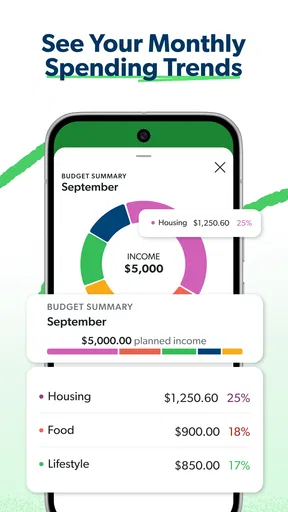
The app’s design is not only sleek but also user-friendly. I never felt lost or overwhelmed, which is crucial for something as intricate as budgeting. The navigation is smooth, and the performance is snappy, with no noticeable lag even when flipping between months or drilling down into expense categories.
One of the delightful touches is the motivational quotes that pop up occasionally. It’s like having a little cheerleader in your pocket, reminding you that financial freedom is within reach.
Room for Improvement
While the free version packs a punch, some might find the premium features tempting. The paid plan offers additional perks like bank sync and detailed reporting. However, if you’re on a tight budget, you might need to weigh the cost versus benefit.
Additionally, while the app is comprehensive, it might not cater to every unique financial situation. If you have complex investments or irregular income, you might find yourself needing to input more data manually.
Final Thoughts
In the end, EveryDollar does what it sets out to do: make budgeting accessible and even enjoyable. Whether you’re saving for a vacation, paying off debt, or just trying to be more mindful of your spending, this app has your back.
It’s not just about tracking dollars; it’s about empowering you to make informed decisions and take charge of your financial future. So, if you’re ready to ditch the spreadsheets and embrace a smarter way to budget, give EveryDollar a try. Your wallet will thank you.
A payday plan that holds up in real life
Here is the sort of everyday situation where I find a category-first budget useful. Imagine payday arrives, and you have groceries, a utility bill, fuel, and a small savings goal competing for the same pool of money. I would enter the expected income, fund the essentials first, and then decide what remains for flexible spending. When an unplanned expense appears later, I can move money between categories deliberately instead of treating the account balance as permission to spend it.
That adjustment is a practical strength, but it is not a magic fix: moving money does not create more of it. The useful habit is to notice which category gives something up and whether that is a one-off choice or a sign that next month’s plan needs changing. I would use the app’s category view before a grocery run or other variable purchase, not just at the end of the month when the opportunity to choose differently has passed.
Small routines that make the budget more useful
A common stumbling block is making a detailed first budget and then avoiding it because it feels too strict. I would begin with a manageable set of categories and add detail only when it helps answer a real question. For example, separating household supplies from groceries is worthwhile if the combined amount repeatedly hides overspending; if it does not change a decision, keeping them together is simpler.
Another helpful practice is to review the plan at a consistent moment, such as when you receive income or before the week’s main shopping trip. That makes the budget a decision aid rather than a report card. If you share spending decisions with someone else, agree on category amounts together and check the plan before a large discretionary purchase. The app can organize the conversation, but it cannot settle different priorities for you.
For irregular income, I would avoid treating an expected payment as money already available. Build the plan around income that has actually arrived, then revise it when the next payment comes in. This takes more attention than a fixed-pay routine, but it reduces the risk of assigning the same anticipated dollars to several purposes. Anyone whose income changes substantially may prefer a spreadsheet or another flexible planning method if frequent revisions become burdensome.
Choosing between this, a bank view, and a spreadsheet
The usual alternatives solve different problems. A bank app is convenient for checking balances and reviewing posted activity, but its spending categories generally look backward; a zero-based plan asks what each part of your income is meant to do next. A spreadsheet can be shaped around unusual needs and formulas, although you take responsibility for keeping its structure and figures current. EveryDollar sits between those options for people who want a guided category budget without building the whole system themselves.
That middle ground is not automatically the best one. If you enjoy designing your own financial model, a spreadsheet may be more satisfying. If you only need a quick balance check, switching between a separate budgeting routine and your bank may feel like needless work. I would choose EveryDollar when the act of assigning money to purposes is the part I want help organizing, and skip it when transaction history or custom analysis matters more than a planned monthly allocation.
Questions worth settling before making it your routine
Do you need to pay to get started? No: the app is free to download, and in-app purchases are available. I would try the free workflow first and decide whether a paid option addresses a specific frustration. Since purchase amounts vary, check the option shown in the app before committing rather than making a decision from a general price range.
Will it work if your pay varies? It can still support a budget, but you should expect to revise the plan as income arrives and avoid assigning unreceived money. Is it mainly for tracking what you already spent? Its distinctive emphasis is planning category amounts, so people who want only an automatic spending summary may be happier with a bank’s tools. And can you use it for complex investing? I would not choose it as a substitute for dedicated investment or net-worth analysis; its clearest role is everyday budgeting.
EveryDollar is listed as version 2026.2.20, and its release date is July 10, 2016. Those details matter less to my decision than whether the current version fits the way I actually handle money, but they do place it as an established app rather than a brand-new budgeting experiment. I would still assess the day-to-day workflow on my own needs, especially if I rely on bank connection or use more than one device.
My buy-or-skip verdict
I would recommend trying EveryDollar if you want a clear, hands-on way to give income jobs before spending it, and if you are willing to revisit your categories as real life changes the plan. It makes particular sense for a beginner who wants structure, or for a household that needs a shared starting point for everyday choices. The free entry point lets you judge whether that routine suits you before considering a purchase.
I would skip it if you want a fully passive spending tracker, advanced investment tools, or a highly customized financial model that you would rather build yourself. Paid access is worth considering only when the specific option solves a problem you have encountered in practice; it is not a substitute for the planning habit itself. For me, the deciding question is simple: will assigning each dollar a purpose help me make better choices this month? If yes, EveryDollar is a sensible app to try; if not, a bank app or spreadsheet may be the more natural fit.
Pros
- User-friendly interface for easy navigation.
- Customizable categories to fit personal needs.
- Real-time expense tracking keeps you updated.
- Syncs across devices for convenience.
- No ads for a distraction-free experience.
Cons
- Requires a premium upgrade for advanced features.
- Limited integration with external bank accounts.
- Manual entry for expenses can be tedious.
- Lacks international currency support.
- No bill payment feature included.
FAQs for EveryDollar: Budget Management
What is EveryDollar and how does it work?
EveryDollar is a budgeting app designed to help users manage their finances effectively. It follows a zero-based budgeting system, which means every dollar you earn is assigned a specific purpose. Users can track their income and expenses, set financial goals, and monitor their progress through a user-friendly interface.
Is EveryDollar free to use?
EveryDollar offers a free version with basic budgeting features. However, for a more comprehensive experience, including bank account syncing and automatic transaction tracking, users can upgrade to EveryDollar Plus, which requires a monthly or annual subscription. This premium version provides additional tools to streamline the budgeting process.
Can EveryDollar connect to my bank accounts?
Yes, EveryDollar Plus, the premium version of the app, allows users to connect their bank accounts. This feature enables automatic transaction importing, which helps keep your budget up-to-date effortlessly. The free version does not include this feature, so users must manually enter transactions.
How secure is my financial information on EveryDollar?
EveryDollar takes security seriously, employing bank-level encryption to protect your data. They use secure servers and encryption protocols to ensure your information remains confidential. While no system is completely infallible, EveryDollar prioritizes user privacy and security in their design and operations.
Does EveryDollar offer customer support?
Yes, EveryDollar offers customer support to assist users with any issues or questions. Support includes help documentation and the option to contact their support team via email. Premium users may receive additional support options, ensuring a smoother experience with troubleshooting and inquiries.


